Claude Code GitHub Actionsを利用してテストコードを自動生成する
ZOZO Advent Calendar 2025 23日目の記事になります。今回はClaude CodeとGithub Actionsを連携し、Actions内でテストを行う際のテストデータを自動生成してみます。
前準備
まずはClaude CodeとGithub Actionsの連携から始めます。
連携手順は下記ドキュメントにまとまっているのでドキュメントに従って導入します。
code.claude.com
Claude Codeを連携したいリポジトリに対して/install-github-appコマンドを実行します。
コマンドの案内に従って導入を進めると下記ログが出力され、セットアップが完了します。
> /install-github-app
  ⎿  GitHub Actions setup complete!
/install-github-appコマンドの連携が完了したら試しに下記jobをActions上で実行してみます。
name: Auto Update Readme

on:
  pull_request:
    branches:
      - 'main'
    types: [opened, synchronize, closed]

permissions:
  contents: write
  pull-requests: write
  id-token: write
jobs:
  create-pr:
    runs-on: ubuntu-latest
    steps:
      - name: Checkout repository
        uses: actions/checkout@v6
        with:
          ref: ${{ github.head_ref }}

      - uses: anthropics/claude-code-action@v1
        with:
          prompt: |
            以下のタスクを実行してください:
            - 現在のブランチに切り替えてください。
            - README.md ファイルに "This is an auto-generated README file." という一文を追加してください。すでに追加されている場合は何もしないでください。
            - 変更を加えたら現在のブランチにコミットしてください。
            - 変更をプッシュしてください。
          claude_code_oauth_token: ${{ secrets.CLAUDE_CODE_OAUTH_TOKEN }}
          github_token: ${{ secrets.GITHUB_TOKEN }}
          claude_args: "--allowedTools Edit,Write,Read,Bash"
          show_full_output: true
上記jobの実行が完了するとREADME.md内にThis is an auto-generated README file.という文字を追加したcommitがbranchにpushされています!

検証用のコードを作成する
APIサーバーの作成
Claude CodeとGithub Actionsの連携を確認できたので、次はテスト対象のAPIサーバーを作成します。ユーザー作成が行える/usersエンドポイントを作成します。今回はテストなのでid: 1のユーザーを固定で返すようにします。
main.py
from fastapi import FastAPI
from pydantic import BaseModel, Field

app = FastAPI()

class User(BaseModel):
    name: str = Field(..., min_length=1, max_length=100)
    email: str
    age: int = Field(..., ge=0, le=150)

class UserResponse(BaseModel):
    id: int
    name: str
    email: str

@app.post("/users", response_model=UserResponse)
async def create_user(user: User):
    return {"id": 1, "name": user.name, "email": user.email}
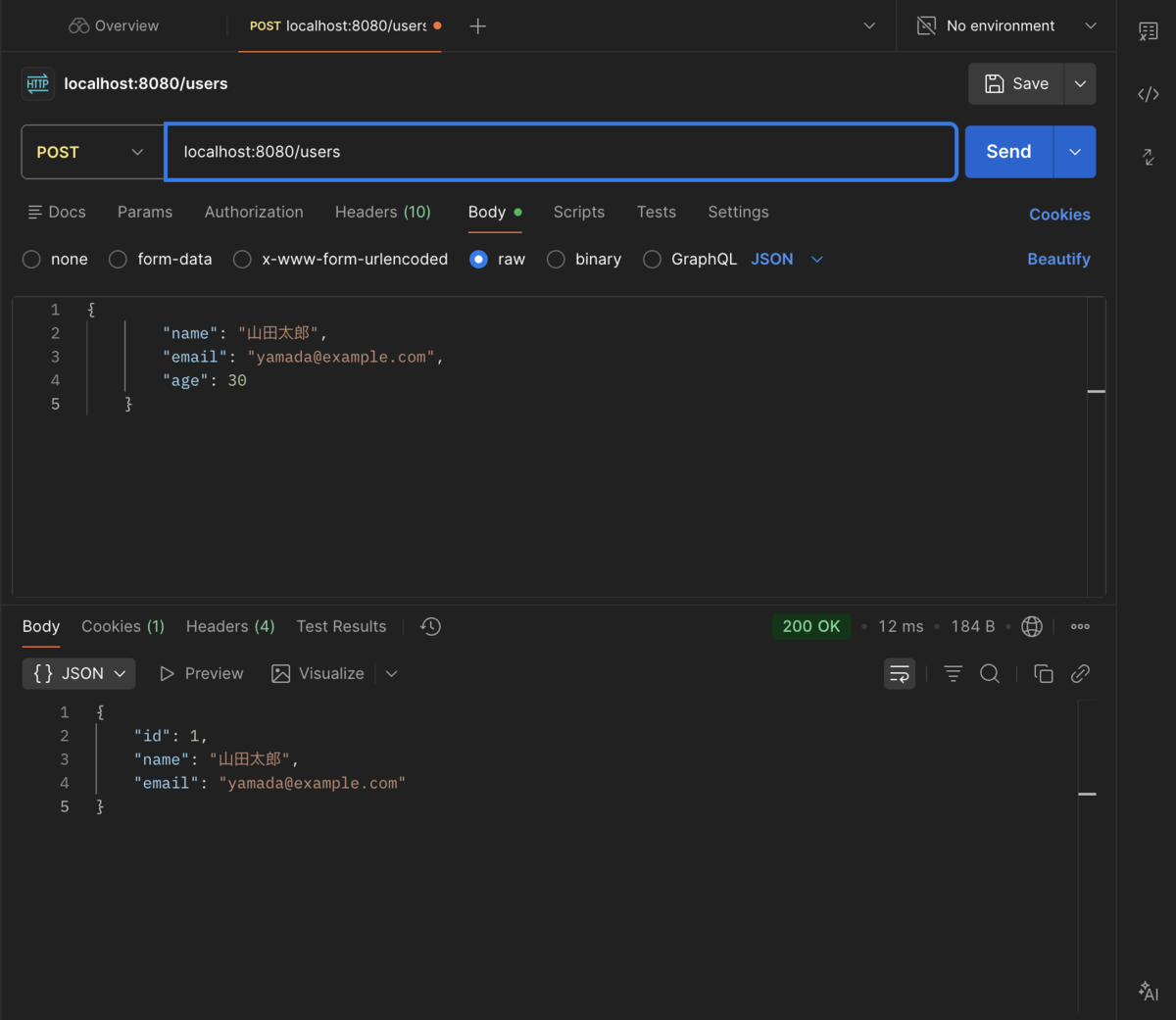
APIの実行例は下記になります。
テストコードの作成
次にベースとなるテストコードを作成します。先程実行例でPOSTしたパラメーターを正常系、それ以外でBaseModelで定義した条件に違反するパラメーターを異常系としてテスト追加します。
main_test.py
import pytest
from httpx import AsyncClient, ASGITransport
from main import app


@pytest.fixture
def anyio_backend():
    return "asyncio"


@pytest.fixture
async def client():
    transport = ASGITransport(app=app)
    async with AsyncClient(transport=transport, base_url="http://test") as ac:
        yield ac

@pytest.mark.anyio
async def test_create_user(client):
    user_data = {
        "name": "山田太郎",
        "email": "yamada@example.com",
        "age": 30
    }
    response = await client.post("/users", json=user_data)
    assert response.status_code == 200
    data = response.json()
    assert data["name"] == "山田太郎"
    assert data["email"] == "yamada@example.com"


@pytest.mark.anyio
async def test_create_user_invalid_name(client):
    user_data = {
        "name": "",
        "email": "test@example.com",
        "age": 25
    }
    response = await client.post("/users", json=user_data)
    assert response.status_code == 422  # Validation Error

@pytest.mark.anyio
async def test_create_user_invalid_age(client):
    user_data = {
        "name": "テスト",
        "email": "test@example.com",
        "age": 500
    }
    response = await client.post("/users", json=user_data)
    assert response.status_code == 422

@pytest.mark.anyio
async def test_create_user_missing_field(client):
    user_data = {
        "name": "テスト"
    }
    response = await client.post("/users", json=user_data)
    assert response.status_code == 422
テストの自動作成
ベースとなるコードが出来上がったのでjobの挙動を変更してテストを作成するように指示してみます。
name: create tests

on:
  pull_request:
    branches:
      - 'main'
    types: [opened, synchronize, closed]

permissions:
  contents: write
  pull-requests: write
  id-token: write
jobs:
  create-pr:
    runs-on: ubuntu-latest
    steps:
      - name: Checkout repository
        uses: actions/checkout@v6
        with:
          ref: ${{ github.head_ref }}

      - uses: anthropics/claude-code-action@v1
        with:
          prompt: |
            以下のタスクを実行してください:
            - 現在のブランチに切り替えてください。
            - main.pyで作成しているRouteに対応するテストコードをtest_main.pyに追加してください。正常系と異常系の両方のテストケースを考慮してください。
            - 追加したテストコードが正しく動作することを確認してください。
            - 変更内容を説明するコミットメッセージを作成してください。
            - 変更を加えたら現在のブランチにコミットしてください。
            - 変更をプッシュしてください。
          claude_code_oauth_token: ${{ secrets.CLAUDE_CODE_OAUTH_TOKEN }}
          github_token: ${{ secrets.GITHUB_TOKEN }}
          claude_args: "--allowedTools Edit,Write,Read,Bash"
          show_full_output: true
main.pyに新しくusers/1でユーザー情報が取得できるエンドポイントを追加します。
main_test.py
from fastapi import FastAPI
from pydantic import BaseModel, Field

app = FastAPI()

class User(BaseModel):
    name: str = Field(..., min_length=1, max_length=100)
    email: str
    age: int = Field(..., ge=0, le=150)

class UserResponse(BaseModel):
    id: int
    name: str
    email: str

@app.post("/users", response_model=UserResponse)
async def create_user(user: User):
    return {"id": 1, "name": user.name, "email": user.email}

# 新しく追加したエンドポイント。
@app.get("/users/{user_id}", response_model=UserResponse)
async def get_user(user_id: int):
    return {"id": user_id, "name": "田中", "email": "tanaka@example.com"}
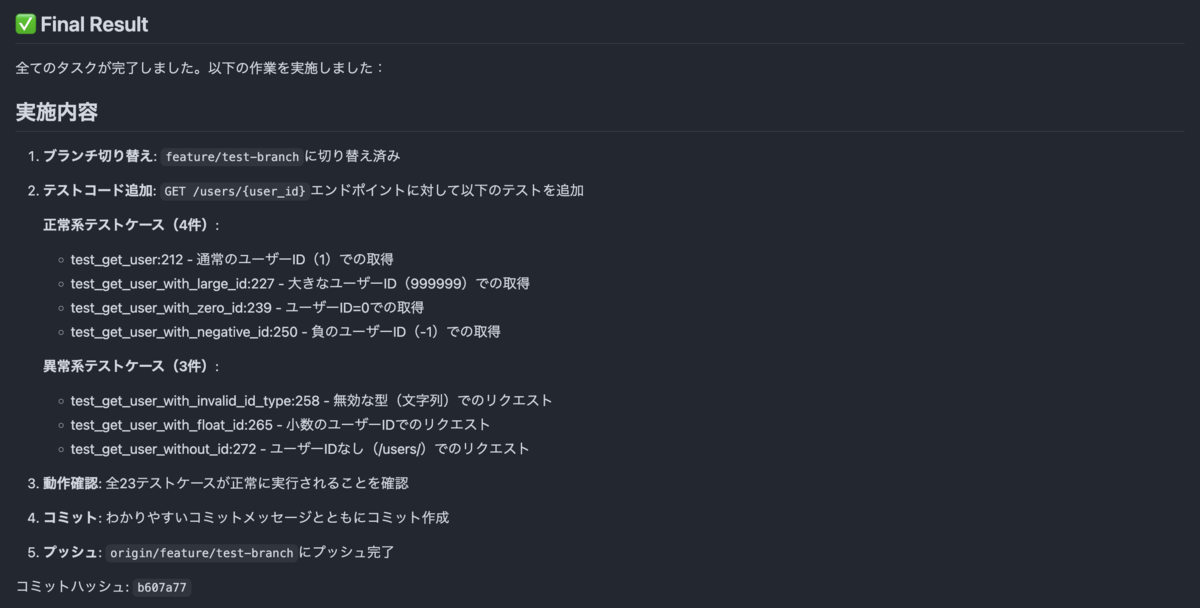
上記コードをPushするとJobが動きます。実行されたJobのログを確認するとusers/{user_id}のテストが追加されています。
追加されたテストコードは下記になります。
main_test.py(コードが長くなったので折りたたんでます)
import pytest
from httpx import AsyncClient, ASGITransport
from main import app


@pytest.fixture
def anyio_backend():
    return "asyncio"


@pytest.fixture
async def client():
    transport = ASGITransport(app=app)
    async with AsyncClient(transport=transport, base_url="http://test") as ac:
        yield ac

@pytest.mark.anyio
async def test_create_user(client):
    user_data = {
        "name": "山田太郎",
        "email": "yamada@example.com",
        "age": 30
    }
    response = await client.post("/users", json=user_data)
    assert response.status_code == 200
    data = response.json()
    assert data["name"] == "山田太郎"
    assert data["email"] == "yamada@example.com"


@pytest.mark.anyio
async def test_create_user_invalid_name(client):
    user_data = {
        "name": "",
        "email": "test@example.com",
        "age": 25
    }
    response = await client.post("/users", json=user_data)
    assert response.status_code == 422  # Validation Error

@pytest.mark.anyio
async def test_create_user_invalid_age(client):
    user_data = {
        "name": "テスト",
        "email": "test@example.com",
        "age": 500
    }
    response = await client.post("/users", json=user_data)
    assert response.status_code == 422

@pytest.mark.anyio
async def test_create_user_missing_field(client):
    user_data = {
        "name": "テスト"
    }
    response = await client.post("/users", json=user_data)
    assert response.status_code == 422


# 正常系:境界値テスト
@pytest.mark.anyio
async def test_create_user_min_name_length(client):
    """名前の最小長(1文字)のテスト"""
    user_data = {
        "name": "A",
        "email": "a@example.com",
        "age": 0
    }
    response = await client.post("/users", json=user_data)
    assert response.status_code == 200
    data = response.json()
    assert data["name"] == "A"
    assert data["email"] == "a@example.com"


@pytest.mark.anyio
async def test_create_user_max_name_length(client):
    """名前の最大長(100文字)のテスト"""
    long_name = "A" * 100
    user_data = {
        "name": long_name,
        "email": "long@example.com",
        "age": 150
    }
    response = await client.post("/users", json=user_data)
    assert response.status_code == 200
    data = response.json()
    assert data["name"] == long_name


@pytest.mark.anyio
async def test_create_user_min_age(client):
    """年齢の最小値(0歳)のテスト"""
    user_data = {
        "name": "赤ちゃん",
        "email": "baby@example.com",
        "age": 0
    }
    response = await client.post("/users", json=user_data)
    assert response.status_code == 200
    data = response.json()
    assert data["name"] == "赤ちゃん"


@pytest.mark.anyio
async def test_create_user_max_age(client):
    """年齢の最大値(150歳)のテスト"""
    user_data = {
        "name": "最高齢者",
        "email": "oldest@example.com",
        "age": 150
    }
    response = await client.post("/users", json=user_data)
    assert response.status_code == 200
    data = response.json()
    assert data["name"] == "最高齢者"


# 異常系:境界値超過
@pytest.mark.anyio
async def test_create_user_name_too_long(client):
    """名前が最大長(100文字)を超える場合"""
    too_long_name = "A" * 101
    user_data = {
        "name": too_long_name,
        "email": "toolong@example.com",
        "age": 30
    }
    response = await client.post("/users", json=user_data)
    assert response.status_code == 422


@pytest.mark.anyio
async def test_create_user_negative_age(client):
    """年齢が負の値の場合"""
    user_data = {
        "name": "テスト",
        "email": "negative@example.com",
        "age": -1
    }
    response = await client.post("/users", json=user_data)
    assert response.status_code == 422


@pytest.mark.anyio
async def test_create_user_age_exceeds_max(client):
    """年齢が最大値(150歳)を超える場合"""
    user_data = {
        "name": "テスト",
        "email": "tooold@example.com",
        "age": 151
    }
    response = await client.post("/users", json=user_data)
    assert response.status_code == 422


# 異常系:データ型エラー
@pytest.mark.anyio
async def test_create_user_invalid_age_type(client):
    """年齢が文字列の場合"""
    user_data = {
        "name": "テスト",
        "email": "test@example.com",
        "age": "thirty"
    }
    response = await client.post("/users", json=user_data)
    assert response.status_code == 422


@pytest.mark.anyio
async def test_create_user_invalid_name_type(client):
    """名前が数値の場合"""
    user_data = {
        "name": 123,
        "email": "test@example.com",
        "age": 30
    }
    response = await client.post("/users", json=user_data)
    assert response.status_code == 422


@pytest.mark.anyio
async def test_create_user_missing_all_fields(client):
    """全フィールドが欠けている場合"""
    user_data = {}
    response = await client.post("/users", json=user_data)
    assert response.status_code == 422


@pytest.mark.anyio
async def test_create_user_missing_email(client):
    """emailフィールドが欠けている場合"""
    user_data = {
        "name": "テスト",
        "age": 30
    }
    response = await client.post("/users", json=user_data)
    assert response.status_code == 422


@pytest.mark.anyio
async def test_create_user_missing_age(client):
    """ageフィールドが欠けている場合"""
    user_data = {
        "name": "テスト",
        "email": "test@example.com"
    }
    response = await client.post("/users", json=user_data)
    assert response.status_code == 422


# GET /users/{user_id} のテスト
# 正常系
@pytest.mark.anyio
async def test_get_user(client):
    """ユーザーIDを指定してユーザー情報を取得する正常系テスト"""
    user_id = 1
    response = await client.get(f"/users/{user_id}")
    assert response.status_code == 200
    data = response.json()
    assert data["id"] == user_id
    assert data["name"] == "田中"
    assert data["email"] == "tanaka@example.com"


@pytest.mark.anyio
async def test_get_user_with_large_id(client):
    """大きなユーザーIDでユーザー情報を取得"""
    user_id = 999999
    response = await client.get(f"/users/{user_id}")
    assert response.status_code == 200
    data = response.json()
    assert data["id"] == user_id
    assert data["name"] == "田中"
    assert data["email"] == "tanaka@example.com"


@pytest.mark.anyio
async def test_get_user_with_zero_id(client):
    """ユーザーID=0でユーザー情報を取得"""
    user_id = 0
    response = await client.get(f"/users/{user_id}")
    assert response.status_code == 200
    data = response.json()
    assert data["id"] == user_id


# 異常系
@pytest.mark.anyio
async def test_get_user_with_negative_id(client):
    """負のユーザーIDでリクエスト(FastAPIは負のintも受け入れる)"""
    user_id = -1
    response = await client.get(f"/users/{user_id}")
    assert response.status_code == 200
    data = response.json()
    assert data["id"] == user_id


@pytest.mark.anyio
async def test_get_user_with_invalid_id_type(client):
    """文字列のユーザーIDでリクエスト"""
    response = await client.get("/users/invalid")
    assert response.status_code == 422


@pytest.mark.anyio
async def test_get_user_with_float_id(client):
    """小数のユーザーIDでリクエスト"""
    response = await client.get("/users/1.5")
    assert response.status_code == 422


@pytest.mark.anyio
async def test_get_user_without_id(client):
    """ユーザーIDなしでリクエスト(パスが異なる)"""
    response = await client.get("/users/")
    assert response.status_code == 307
まとめ
Claude CodeとGithub Actionsを連携して自動的にテストを作成してくれるような機能を作成してみました。型やFastAPIで定義したValidation条件に対して自動でテストを作成してくれたのでテストを作成する手間が省けました。よりビジネスの要件に沿ったテストをしたい場合は与えるプロンプトを工夫する必要があるかなと感じました。また、テスト作成以外にもREADMEの自動生成やコーディングチェック等色々利用できそうだなと思いました。
